Managing Subscriptions
To view your APIMatic subscription, the current plan and the monthly statements visit the Subscription page on the website. Also, APIMatic offers various pricing plans to suit the need of the users. These plans include Basic, Starter, Buisness and Executive. To learn more about our pricing plans, please click here.
View Subscription Section
Click on the arrow visible next to your name on the header navigation (once you have logged in). From the drop-down menu, click on Settings.
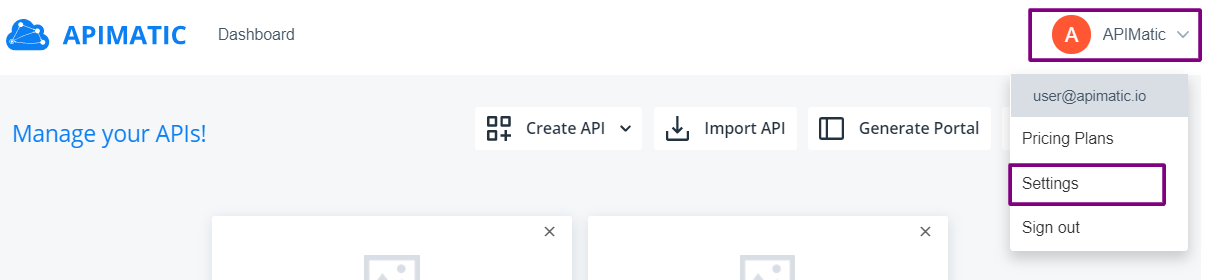
From the left context menu, click on Subscription.
Subscription Overview
This section provides an overall summary of the currently active subscription plan, usage statistics and billing information of your APIMatic account.

Current Status
The currently active subscription plan is shown here along with its name and status.
caution
A retired plan corresponds to an old KLOC based plan which has a 3 month transition period (end of November 2016) after which a new suitable plan must be chosen.
Balance
The outstanding balance in US Dollars.
Next Billing Amount
The billing amount for the next billing period in US Dollars.
Generations used today
The number of SDKs generated on that particular day. The number of generations allowed per day depend on the subcription plan that you have.
Next billing date
The date at which the next billing period starts.
Advanced settings
View Plan
You can view the current plan of your subscription containing Features and Languages etc.
Upgrade Plan
To change your existing plan to the new one, go to our pricing plans.
Transfer Subscription
Transfers the current subscription to the requested user.
- Subscriptions can only be transferred to a team member.
- Upon the recipient accepting the transfer, their previous subscription will be cancelled.
- Team ownership will also be transferred to the new recipient.
- Payment information is removed from the dashboard of the previous subscription owner.
- Once the transfer is completed, the previous subscription owner will become a team member.
Cancel Subscription
Cancels the current subscription.
Changing your subscription
To change the current subscription to the new one, refer to the Contact Support.